Value Suggestions
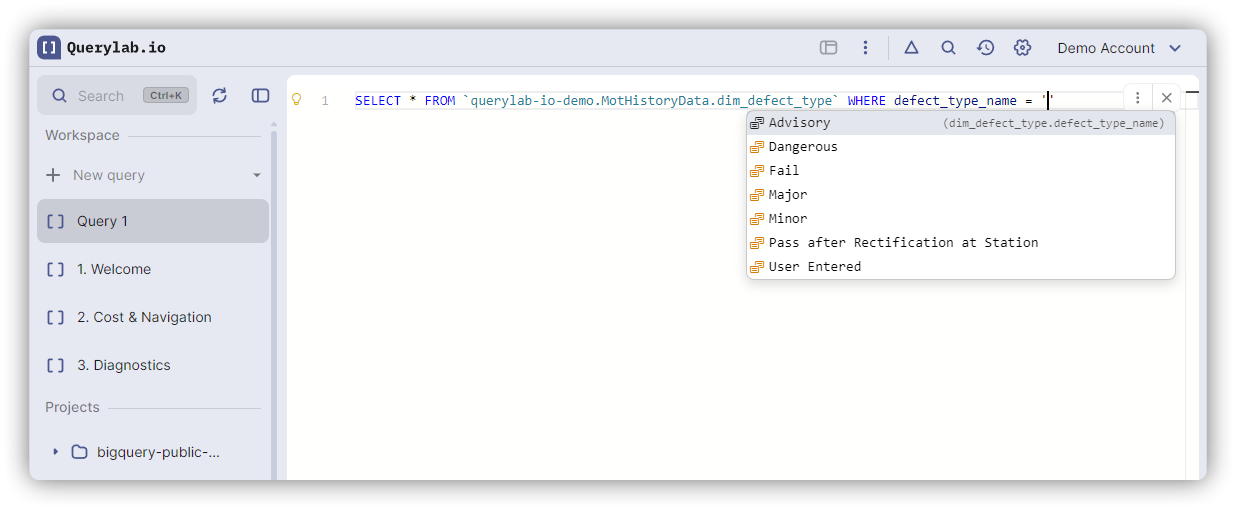
Querylab.io suggests actual values from your tables when writing WHERE, HAVING, and IN clauses, based on sampled data from BigQuery.
How Value Suggestions Work
When you type inside a string literal in a filter condition, the editor fetches sample values from the referenced column:
SELECT * FROM events
WHERE event_type = '|'
As you type inside the quotes, completions show actual values from the event_type column:
- 'page_view'
- 'click'
- 'purchase'
- 'signup'
Press Tab to accept a value.
Where Value Suggestions Appear
WHERE Clause Comparisons
WHERE status = '|'
Shows values: 'active', 'inactive', 'pending', 'suspended'
HAVING Clause
SELECT country, COUNT(*) as total
FROM users
GROUP BY country
HAVING country = '|'
Shows country values from the users table.
IN Clause
WHERE status IN ('active', '|')
Shows remaining values (excluding 'active' which is already in the list):
- 'inactive'
- 'pending'
- 'suspended'
Comparison Operators
Value suggestions work with these operators:
=(equals)!=or<>(not equals)IN(list membership)NOT IN(exclusion)
String Values Only (Currently)
Value suggestions currently work for string literals only:
-- Works
WHERE status = '|'
-- Not yet supported
WHERE priority = | (numeric values)
WHERE created_date = | (date values)
Numeric and date value suggestions are planned for a future update.
Sample Data Source
Value suggestions use sample data from BigQuery, not the full dataset:
- No query cost: Fetches sample data from BigQuery at no query cost
- Sample size: Up to 100-200 rows
- Freshness: Sample data updates daily
The samples are representative but may not include all distinct values, especially for:
- High-cardinality columns (thousands of unique values)
- Recently added values
- Rare values
Filtering As You Type
The completion list filters as you type inside the quotes:
WHERE event_type = 'pa|'
Shows only values starting with "pa":
- 'page_view'
- 'page_load'
Case-insensitive matching helps find values quickly.
Excluding Existing Values
In IN clauses, the editor filters out values already present:
WHERE status IN ('active', 'pending', '|')
Completions show only:
- 'inactive'
- 'suspended'
(Not 'active' or 'pending' since they're already in the list)
Performance and Caching
First Request
The first time you request values for a column:
- Takes a moment to load (network fetch from BigQuery)
- Loading indicator: Completion dropdown shows "Loading..."
Subsequent Requests
After the initial fetch:
- Instant (results are saved locally)
Prefetching
The editor can prefetch values when you complete the FROM clause:
FROM events| [Table name accepted]
Immediately starts loading sample data for common filter columns, so values are ready when you reach the WHERE clause.
High-Cardinality Columns
For columns with too many distinct values (>1000), value suggestions may not appear:
WHERE user_id = '|'
No suggestions (user_id has millions of unique values). The editor detects high cardinality and skips value completions to avoid overwhelming you with options.
NULL Values
If a column contains NULL values, the editor suggests using IS NULL instead of = NULL:
WHERE status = |
Shows:
IS NULL(special completion)- 'active', 'inactive', etc. (string values)
Selecting IS NULL replaces = with IS:
WHERE status IS NULL
Data Freshness
Sample values are refreshed automatically when:
- You run a DDL statement (CREATE, ALTER, DROP) on the table
- You manually refresh the table schema in the tree view
- Daily cache expiration occurs
Data Privacy
Value suggestions use the same authentication and permissions as table preview:
- Only shows data you have access to
- Uses your Google Cloud credentials
- No data leaves your browser except to/from BigQuery APIs
Sample values are stored locally in your browser, not sent to any third-party service.
Limitations
Current Limitations
- String values only - Numeric and date values not yet supported
- Tables in FROM clause only - No cross-table value suggestions
- Sample data - May miss rare values
- No LIKE patterns - Doesn't suggest wildcard patterns like 'prefix%'
Future Improvements
These features may be added in future updates:
- Numeric value suggestions
- Date value suggestions
- Smart suggestions for LIKE patterns
- Frequency-based ranking
Disabling Value Suggestions
Value suggestions cannot be disabled independently, but they only appear when you type inside string literals in filter conditions. Simply ignore them if you prefer typing values manually.
Related Features
- Auto-Completions - General completion behavior
- Hierarchical Completions - Navigating table schemas
- Ghost Completions - Inline gray suggestions