Ghost Completions
Ghost completions appear as gray inline text that you can accept with Tab. Unlike dropdown completions, they show a single high-confidence suggestion inline.
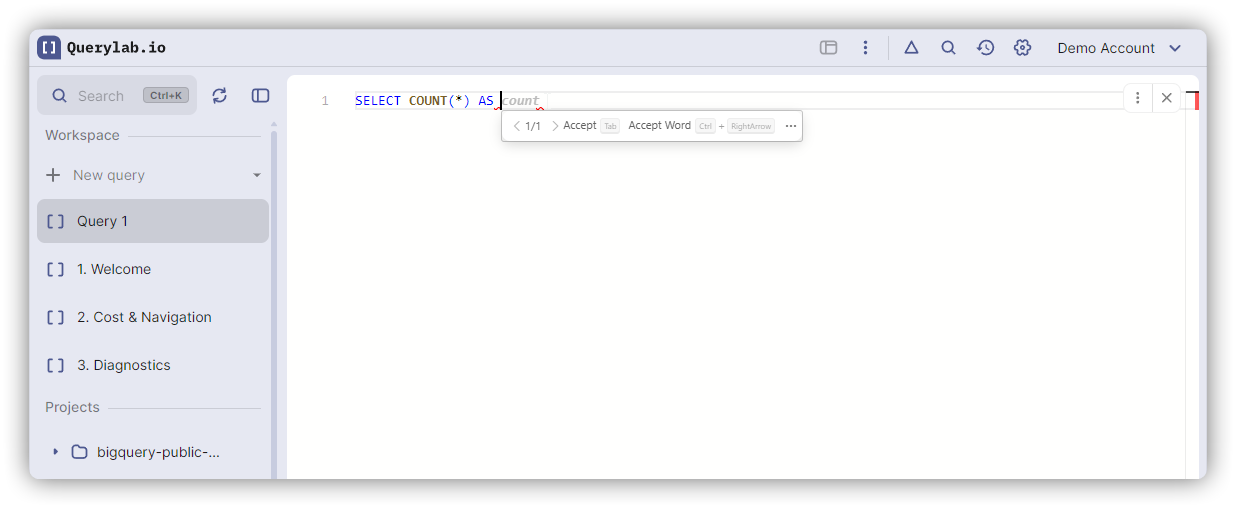
What Are Ghost Completions?
Ghost completions show as faded gray text at your cursor:
SELECT COUNT(*) AS c|ount
--                   ^^^^^ gray ghost text
Press Tab to accept the suggestion, or keep typing to dismiss it.
How Ghost Completions Differ
| Feature | Dropdown Completions | Ghost Completions |
|---|---|---|
| Appearance | List in dropdown menu | Inline gray text |
| Multiple options | Yes, shows all matches | No, single suggestion only |
| Acceptance | Tab or Enter | Tab only |
| When shown | On trigger or Ctrl+Space | For high-confidence patterns |
| Interference | Covers code below | No visual interference |
Types of Ghost Completions
1. Smart Alias Generation
After typing AS in a SELECT clause, ghost text suggests an alias:
SELECT FactPayment AS |fp
--                     ^^ gray ghost text
Press Tab to accept "fp" (first letters of each word).
More examples:
user_accounts AS→ suggests "ua"COUNT(*) AS→ suggests "count"total_revenue AS→ suggests "tr"
If the alias already exists (like "u1"), the editor suggests "u2", "u3", etc.
2. GROUP BY Column Lists
After GROUP BY, ghost text suggests all non-aggregate columns from your SELECT:
SELECT user_id, country, COUNT(*) AS total
FROM users
GROUP BY |user_id, country
--       ^^^^^^^^^^^^^^^^^ gray ghost text
Press Tab to accept both columns at once.
Only appears when:
- SELECT has non-aggregate columns
- No GROUP BY columns typed yet
- Multiple columns need grouping
3. JOIN Condition Suggestions
After JOIN table ON, ghost text suggests the join condition when there's an obvious foreign key relationship:
FROM users u
JOIN orders o ON |u.user_id = o.user_id
--               ^^^^^^^^^^^^^^^^^^^^^^ gray ghost text
Only appears when:
- Both tables have matching column names and types
- Relationship is unambiguous (clear foreign key)
- No condition typed yet
4. Date Filter Patterns
For DATE or TIMESTAMP columns in WHERE clauses, ghost text suggests common date filters:
WHERE created_date |>= DATE_SUB(CURRENT_DATE(), INTERVAL 30 DAY)
--                 ^^^^^^^^^^^^^^^^^^^^^^^^^^^^^^^^^^^^^^^^^^^^^ gray ghost text
Only appears when:
- Column is DATE or TIMESTAMP type (checked from schema, not column name)
- Cursor immediately after column name
- No operator typed yet
5. JOIN Comparison Right Side
After typing the left side of a join comparison, ghost text suggests the matching column from the other table:
FROM fact_defect fd
JOIN dim_defect_type ddt ON fd.defect_type = |ddt.defect_type_key
--                                           ^^^^^^^^^^^^^^^^^^^^ gray ghost text
Only appears when:
- Cursor is after = operator in JOIN condition
- Left side column has a matching column in the other table
- Uses same matching logic as JOIN condition suggestions (foreign keys, naming patterns)
- No right side typed yet
6. IS NULL Completions
After IS keyword, ghost text suggests NULL (most common) or NOT NULL:
WHERE status IS |NULL
--              ^^^^ gray ghost text
Only appears when:
- Cursor immediately after IS keyword in WHERE or HAVING clause
- No partial text typed yet (like "N" or "NOT")
Dropdown completions also show both NULL and NOT NULL as options, so you can use either ghost text or dropdown.
7. Closing Syntax
Ghost text completes unclosed syntax when the closing position is deterministic:
SELECT (user_id * 100|)
--                    ^ gray ghost text
Press Tab to close the parenthesis at the correct position.
Also works for:
- Unclosed quotes:
WHERE name = 'John|→ suggests closing quote - Nested parentheses: Suggests closing parens in correct order
Accepting Ghost Completions
- Tab - Accept the gray suggestion
- Enter - Dismiss and insert newline (does NOT accept)
- Escape - Dismiss suggestion
- Any other key - Dismiss and insert that character
Note: Enter does NOT accept ghost completions (only Tab does). This prevents accidental acceptance when you want to format your query with newlines.
When Ghost Text Doesn't Appear
Ghost completions only show when there's 100% confidence in the suggestion. They won't appear if:
- You're already typing partial text (use dropdown completions instead)
- Multiple valid options exist (ambiguous situation)
- Content already exists (no need to suggest what's there)
- Schema information is unavailable
- Pattern doesn't match any high-confidence rules
Never Suggests What Exists
Ghost completions don't suggest content you've already written:
-- No ghost text here (alias already complete)
SELECT COUNT(*) AS count|

-- No ghost text here (user already typing)
GROUP BY user_id, |

-- No ghost text here (condition exists)
JOIN orders ON users.id = |
Coexistence with Dropdown Completions
Ghost completions and dropdown completions work together:
SELECT COUNT(*) AS c|ount     -- ← gray ghost text
-- dropdown also shows: count, country, created_at, ...
You can:
- Press Tab to accept the ghost text "count"
- Or select a different option from the dropdown
- Or keep typing to filter both
High-Confidence Only
Ghost completions use static patterns:
- Each pattern has deterministic rules
- If uncertain, shows nothing (better than wrong suggestion)
- Predictable and consistent across sessions
Disabling Ghost Completions
Currently, ghost completions cannot be disabled independently. They only appear in high-confidence situations.
If you find them distracting, simply ignore them - they disappear as soon as you type any key other than Tab.
Related Features
- Auto-Completions - Dropdown completion behavior
- Hierarchical Completions - Dot notation navigation