Pipe Syntax
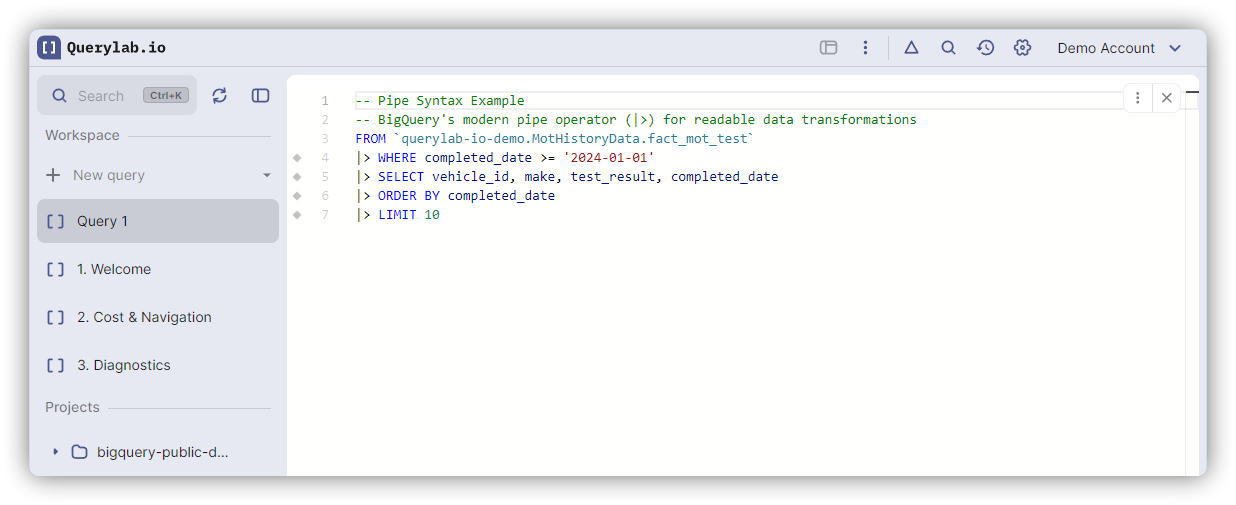
Write and convert BigQuery pipe syntax — a linear, top-to-bottom way to compose SQL using the |> operator.
What is Pipe Syntax?
A data-flow oriented way to write SQL where each step feeds into the next using the |> operator. Unlike standard SQL, pipe syntax reads in execution order: top to bottom.
Standard SQL:
SELECT user_id, COUNT(*) AS orders
FROM orders
WHERE status = 'completed'
GROUP BY user_id
ORDER BY orders DESC;
Pipe Syntax:
FROM orders
|> WHERE status = 'completed'
|> AGGREGATE COUNT(*) AS orders GROUP BY user_id
|> ORDER BY orders DESC;
Operator Reference
All 21 BigQuery pipe operators:
| Standard SQL | Pipe Syntax |
|---|---|
SELECT cols FROM table | FROM table |> SELECT cols |
WHERE condition | |> WHERE condition |
GROUP BY cols + aggregates | |> AGGREGATE ... GROUP BY cols |
HAVING condition | |> WHERE condition (after AGGREGATE) |
SELECT DISTINCT * | |> DISTINCT |
JOIN table ON ... | |> JOIN table ON ... |
ORDER BY cols | |> ORDER BY cols |
LIMIT n | |> LIMIT n |
| (no equivalent) | |> EXTEND expr AS alias |
| (no equivalent) | |> SET col = expr |
| (no equivalent) | |> DROP col1, col2 |
| (no equivalent) | |> RENAME old AS new |
AS alias | |> AS alias |
WITH cte AS (...) | |> WITH cte AS (...) |
TABLESAMPLE SYSTEM (n PERCENT) | |> TABLESAMPLE SYSTEM (n PERCENT) |
PIVOT(agg FOR col IN (...)) | |> PIVOT(agg FOR col IN (...)) |
UNPIVOT(val FOR name IN (...)) | |> UNPIVOT(val FOR name IN (...)) |
ML.PREDICT(MODEL m, TABLE t) | FROM t |> CALL ML.PREDICT(MODEL m) |
UNION ALL | |> UNION ALL (...) |
INTERSECT DISTINCT | |> INTERSECT DISTINCT (...) |
EXCEPT DISTINCT | |> EXCEPT DISTINCT (...) |
MATCH_RECOGNIZE(...) | |> MATCH_RECOGNIZE(...) |
Pipe-Only Operators
These operators only exist in pipe syntax. They have no standard SQL equivalent.
EXTEND
Add computed columns without listing all existing columns:
FROM users
|> EXTEND UPPER(name) AS name_upper;
Keeps all columns and adds name_upper.
SET, DROP, RENAME
Modify columns in place without rewriting the full SELECT list:
FROM users
|> SET name = UPPER(name)
|> DROP password, salt
|> RENAME email AS contact_email;
DISTINCT
Remove duplicate rows while preserving table aliases:
FROM users
|> DISTINCT
|> WHERE age > 18;
AGGREGATE
Replace GROUP BY + SELECT with a single operator. Grouping columns are listed once and automatically included in output:
FROM orders
|> AGGREGATE
     SUM(amount) AS total,
     COUNT(*) AS cnt
   GROUP BY region;
No need to repeat region in a SELECT — it's included automatically. Supports ROLLUP, CUBE, GROUPING SETS, and an inline GROUP AND ORDER BY shorthand that combines grouping and sorting:
-- GROUP AND ORDER BY groups and sorts in one step
FROM orders
|> AGGREGATE SUM(amount) AS total
   GROUP AND ORDER BY customer_id;
This is equivalent to GROUP BY customer_id |> ORDER BY customer_id. Useful when you want results sorted by the grouping key.
Advanced Operators
WITH (Scoped CTEs)
Define common table expressions mid-pipeline:
FROM orders
|> WHERE status = 'completed'
|> WITH regional AS (
     FROM regions |> SELECT id, name
   )
|> JOIN regional ON orders.region_id = regional.id
|> SELECT regional.name, orders.amount;
Pipe WITH passes the input table through unchanged and makes the CTE available to subsequent operations.
Set Operations
UNION, INTERSECT, and EXCEPT work in pipe syntax:
-- Standard SQL
SELECT id FROM users UNION ALL SELECT id FROM admins

-- Pipe Syntax
FROM users
|> SELECT id
|> UNION ALL (FROM admins |> SELECT id)
BY NAME modifier: match columns by name instead of position. Useful when the two queries return the same columns in different order:
FROM table1
|> UNION ALL BY NAME (SELECT * FROM table2)

-- Also works with INTERSECT and EXCEPT
FROM table1
|> EXCEPT DISTINCT BY NAME (SELECT * FROM table2)
Without BY NAME, columns are matched by position and names are ignored.
Multiple arguments: pass multiple queries to a single set operator without repeating the keyword:
FROM table1
|> UNION ALL
    (SELECT * FROM table2),
    (SELECT * FROM table3)
PIVOT and UNPIVOT
Transform rows to columns and vice versa:
-- PIVOT: Rows to columns
FROM sales
|> PIVOT(SUM(revenue) FOR quarter IN ('Q1', 'Q2', 'Q3', 'Q4'))

-- UNPIVOT: Columns to rows
FROM quarterly_data
|> UNPIVOT(revenue FOR quarter IN (Q1, Q2, Q3, Q4))
UNPIVOT supports INCLUDE NULLS and EXCLUDE NULLS modifiers.
TABLESAMPLE
Sample data for faster exploration or cost reduction:
FROM large_table
|> TABLESAMPLE SYSTEM (10 PERCENT)
|> SELECT *
BigQuery pipe TABLESAMPLE uses the SYSTEM method with a percentage.
CALL (Table-Valued Functions)
Call table-valued functions (TVFs) including BigQuery ML:
-- Pipe syntax
FROM input_data
|> CALL ML.PREDICT(MODEL `project.dataset.model`)

-- Equivalent standard SQL
SELECT * FROM ML.PREDICT(MODEL `project.dataset.model`, TABLE(input_data))
Works with ML.PREDICT, ML.GENERATE_TEXT, ML.FORECAST, and custom TVFs.
MATCH_RECOGNIZE
Find sequences of rows that match a pattern. Similar to regular expressions, but applied to rows instead of characters:
FROM stock_prices
|> MATCH_RECOGNIZE(
     PARTITION BY ticker
     ORDER BY trade_date
     MEASURES
       FIRST(price) AS start_price,
       LAST(price) AS end_price
     PATTERN (dip+ rise+)
     DEFINE
       dip AS price < PREV(price),
       rise AS price > PREV(price)
   )
PARTITION BY groups rows before matching. MEASURES defines what to output for each match. PATTERN uses quantifiers like + and *. DEFINE specifies what each symbol means in terms of row conditions.
Mixed Syntax
BigQuery supports mixing standard and pipe syntax in the same query.
WITH cleaned AS (
  FROM raw_events
  |> WHERE event_date >= '2024-01-01'
  |> SELECT user_id, event_type
),
stats AS (
  SELECT user_id, COUNT(*) AS count
  FROM cleaned
  GROUP BY user_id
)
SELECT * FROM stats;
Conversion & Tooling
Keyboard Shortcuts
| Action | Mac | Windows/Linux |
|---|---|---|
| Convert to Pipe | Cmd+Alt+P | Ctrl+Alt+P |
| Convert to Standard | Cmd+Alt+S | Ctrl+Alt+S |
Works on full document or selection.
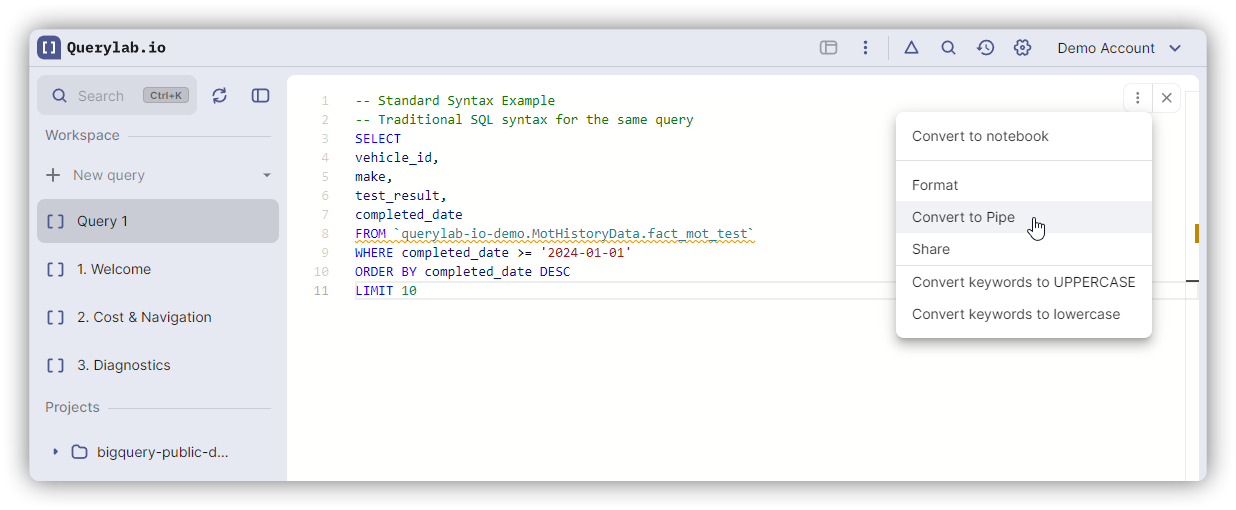
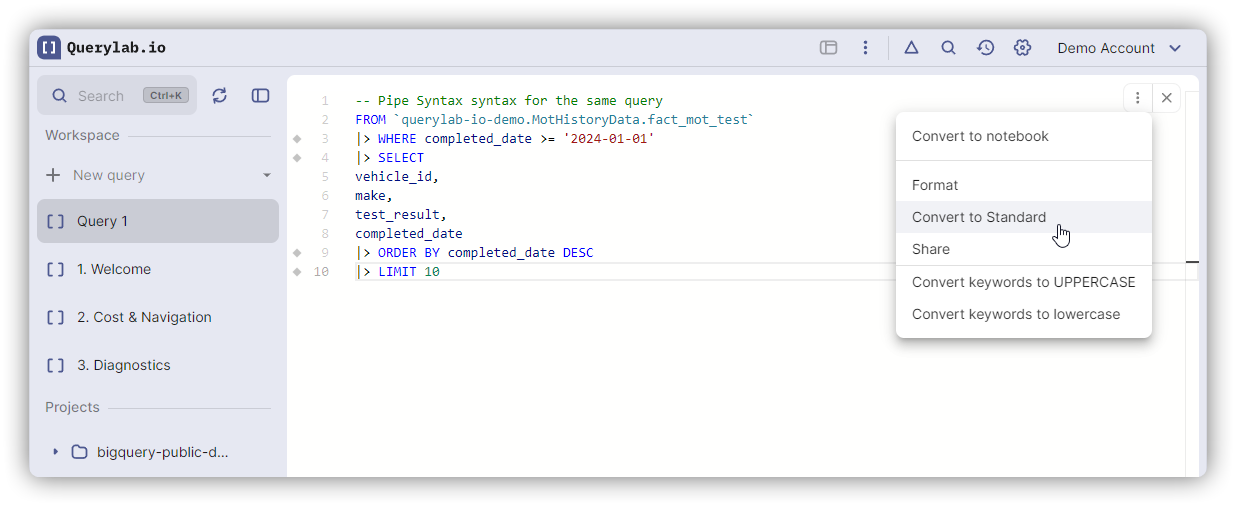
Debugging with Partial Execution
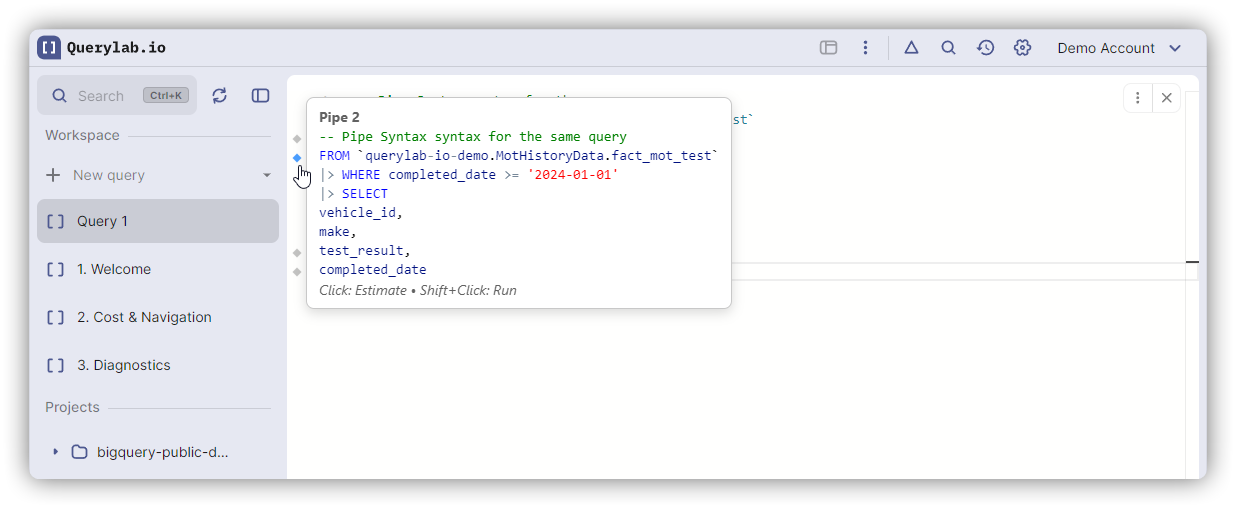
Pipe syntax works with Partial Execution — each |> shows a gutter icon. Shift+Click any pipe operator to execute up to that stage and inspect intermediate results.
Online Converter
Pipe Syntax Converter — paste SQL or pipe, convert in either direction. No login.
Limitations
- SELECT without FROM cannot convert to pipe (pipe requires FROM)
- Use partial conversion (select portion, then convert) for complex queries